Catch a noindex, a blocked AI crawler or a broken OG tag on the preview deploy, before merge.
When Vercel reports a preview deployment ready, the LintPage GitHub Action audits its URL with 60 SEO checks and puts the findings on the pull request as check annotations and a job summary, not a bot comment. A critical finding fails the check run; warnings show up without blocking the merge. This site runs it on its own pull requests.
name: LintPage
on: deployment_status

permissions:
  contents: read

jobs:
  audit:
    # Only a finished preview deployment made by Vercel. startsWith also
    # matches the per-project names Vercel uses when a repo has several.
    if: >-
      github.event.deployment_status.state == 'success' &&
      startsWith(github.event.deployment.environment, 'Preview') &&
      github.event.deployment_status.creator.login == 'vercel[bot]'
    runs-on: ubuntu-latest
    timeout-minutes: 10
    steps:
      - uses: lintpage/action@v1
        with:
          # Used only if your previews are protected; skipped when unset.
          vercel-bypass-secret: ${{ secrets.VERCEL_AUTOMATION_BYPASS_SECRET }}
action: MIT, on GitHub - CLI: free on npm - no account, no API key
A verdict, a score and every finding, in the job summary.
This is the job summary from one of this site's own pull requests: the action audited the Vercel preview of lintpage.com. The same findings appear as annotations on the pull request's checks.
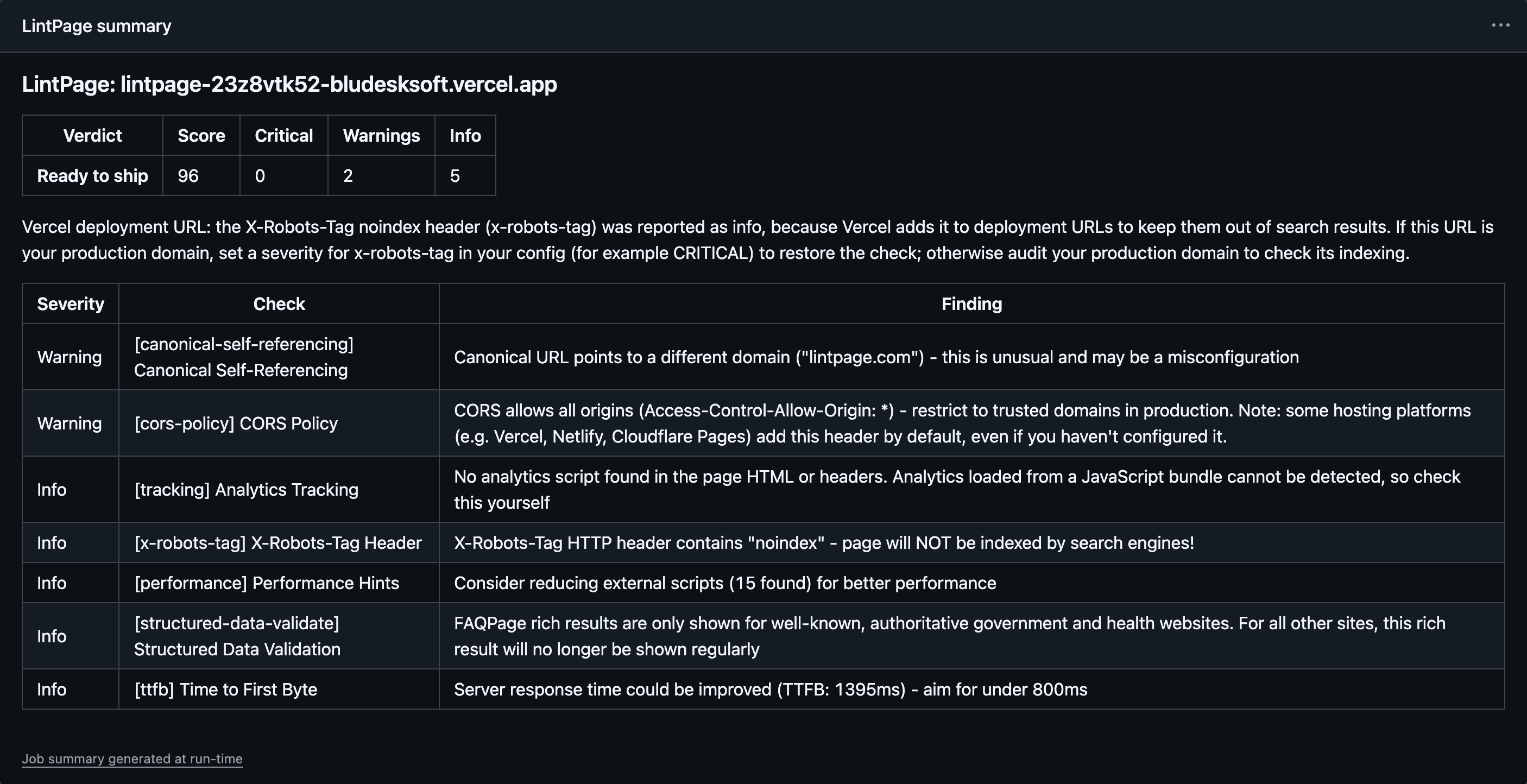
One file, plus a secret if your previews are protected.
- Save the workflow above as
.github/workflows/lintpage.yml. Vercel reports each deployment to GitHub, and the workflow runs when a preview is ready, against that preview's URL. - If your project uses Vercel Deployment Protection, previews redirect to the Vercel login page, and the audit fails with a critical finding that says so. In Vercel, open the project's Settings, then Deployment Protection, and create a Protection Bypass for Automation secret. In GitHub, add it as a repository secret named
VERCEL_AUTOMATION_BYPASS_SECRET. If Deployment Protection is off, skip this step; an unset secret is ignored. - Open a pull request. When the preview is up, a LintPage check appears on it.
The mistakes a code review does not see.
None of these break a build or a test. They break what search engines, AI assistants and link previews see, usually after someone has already merged.
Noindex that slipped through
A robots meta tag or X-Robots-Tag header that keeps the page out of search. On a *.vercel.app URL, the noindex header Vercel adds to preview deployments is reported as info, so it does not drown out a real one.
robots-noindexx-robots-tag
Blocked AI crawlers
GPTBot, ClaudeBot or PerplexityBot getting a 403, 429 or server error even though robots.txt lets them in. ChatGPT-User, Claude-User or Perplexity-User blocked by robots.txt or at the edge. A near-empty page served to bots instead of the real one.
ai/gptbot-silent-blockai/chatgpt-user-blockedai/empty-content-to-bot
Broken share previews
A missing og:image, og:title or og:url; image width and height tags that are missing or below the recommended 1200x630; an image type other than JPEG, PNG, GIF or WebP; a Twitter card with no image.
og-imageog-image-sizeog-image-typetwitter-image
Canonicals and redirects
A canonical tag that is missing, relative or points at another domain, or a page that redirects to another host, such as the Vercel login page, which is reported instead of auditing the wrong page.
canonical-urlcanonical-self-referencingredirected-off-site
Titles and descriptions
Missing or badly sized titles and meta descriptions, and a duplicated title, description or canonical tag: the things a refactor of the layout component quietly breaks.
titlemeta-descriptionduplicate-meta
Plus structured data, headings, accessibility, security headers and performance hints: 60 checks in all.
Any public URL.
On Netlify, Cloudflare Pages, Render or your own servers, list the pages in urls: a staging site, production, or the URL an earlier deploy step printed. Each URL is audited separately, and the check fails if any of them has a critical finding.
name: LintPage
on: pull_request

jobs:
  audit:
    runs-on: ubuntu-latest
    steps:
      - uses: lintpage/action@v1
        with:
          urls: 'https://staging.example.com https://staging.example.com/pricing'
The same checks on localhost.
The action installs the LintPage CLI, which also runs on your own machine against your dev server, in a pre-commit hook or by hand:
npx lintpage localhost:3000Checks that need a public address run on the preview instead. What runs on localhost, and what does not.
Everything you can set.
All inputs are optional. The README on GitHub has the full reference, examples and the notes for each release.
| input | what it does | default |
|---|---|---|
urls | URLs to audit, separated by spaces or newlines. | The deployment URL from the deployment_status event |
vercel-bypass-secret | Vercel Protection Bypass for Automation secret, from a GitHub secret. | None |
fail-on-warning | Fail the check on warnings too, not only on critical findings. | false |
config | Path to a LintPage config file in the checked-out repository. | .lintpagerc.json, .lintpagerc or lintpage.config.json |
quiet | Only the verdict, notices and failing annotations. | false |
version | The lintpage CLI version to install, or latest. | Pinned; raised by action releases |
| output | what it holds |
|---|---|
audited | Number of URLs audited. |
exit-code | Worst result across all URLs: 0 pass, 1 findings that fail the check run, 2 an error or a URL that was skipped. |
Questions, answered.
Is it safe to give the action my Vercel bypass secret? +
How is this different from Lighthouse's SEO score? +
What fails the check, and what only warns? +
Does it run my JavaScript, like a browser? +
Can I change which checks run, or how severe they are? +
What does it cost? +
Does it audit production deployments too? +
Why is the CLI version pinned? +
Put it on your next pull request.
Copy the workflow, push it, and the next preview gets audited.
rather try it on one page first? run a free audit